
Opening Sans Casino on a phone does not require a separate installer; the site adapts to the screen of a mobile browser, and the account is the same as on a computer. This guide covers browser access, a home-screen shortcut, what to do when the address changes and which security settings matter, using information from 17.11.2026. Access may be restricted in some countries and the page is not addressed to UK players. Adults only (18+); gambling can be addictive.
| Topic | Detail |
|---|---|
| Access | Full site in a mobile browser |
| Account | Same username and password as on desktop |
| Announcement channel | Telegram @sanscasino |
| Short links | t.ly/sanscasino and bit.ly/casinosans |
| Shortcut | Can be added to the home screen |
- 01Using Sans Casino on a Phone
- 02Adding a Home-Screen Shortcut
- 03What to Do When the Address Changes on a Phone
- 04Mobile Security Settings
- 05Common Mobile Problems
- ?FAQ
Using Sans Casino on a Phone
In a mobile browser the menu, game lobby, coupon and cashier work as they do on a computer; only the layout adapts to a vertical screen. Balance, bonuses and history belong to the account and not to the device, so a second account on the phone is neither needed nor allowed. Landscape mode makes live tables and the coupon easier to read.
On a weak connection a live stream can stutter, so for live betting or live tables use Wi-Fi or a strong mobile signal. Registration steps are in the sign-up guide and address checks are on the current address page.
Adding a Home-Screen Shortcut
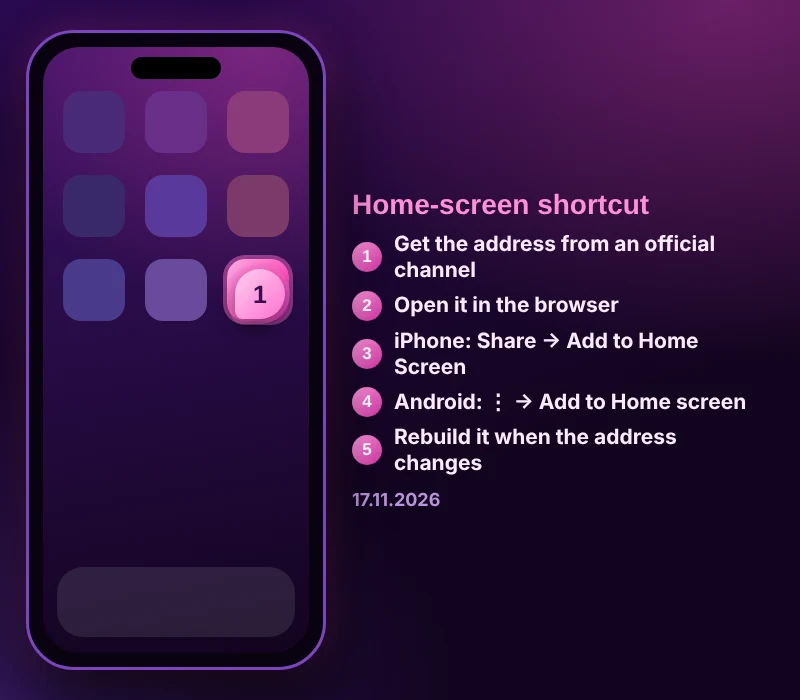
- Get the current address from the official channel @sanscasino or from t.ly/sanscasino.
- Type the address into the mobile browser and check the padlock.
- Confirm that the footer pages open.
- Sign in with your existing account; do not create a new one.
- Open the browser's share or three-dot menu and tap Add to Home Screen.
- Give the shortcut a short name and confirm.
- Turn on notifications for the Telegram channel; when the address changes, delete the old shortcut and add a new one.
A shortcut points to that day's address. If the address changes, an old shortcut stops working, which is the normal result of a domain change and not a fault.
What to Do When the Address Changes on a Phone

When a domain is blocked, the page fails to open or loads halfway. Switch between mobile data and Wi-Fi, then read the latest post in the official channel. Type the announced address into the browser rather than tapping a link in a message.
Clearing the cache solves many failures: delete site data in the browser settings, close and reopen the browser and try again. If data-saver mode is on, turn it off, since it can break some pages.
Mobile Security Settings
Keep the screen lock on, make sure the device lock is strong if the browser stores your password, and avoid logging in on public Wi-Fi. Set the date and time to automatic; a wrong clock causes secure-connection errors.
If an installer file circulates for the site, be cautious: files shared in chat groups, forums or ads can be copies and may infect the device. The official channel never asks for passwords, codes or card details; if someone does, do not reply.
Common Mobile Problems
If the page loads halfway, change the network and clear the cache. If the sign-in screen opens but login fails, use password reset. If a live stream stutters, lower the quality or move to a stronger network. If the keyboard pushes form fields out of view, update the browser. If a page looks outdated, open it in a private tab.
FAQ
Is a separate app needed for Sans Casino?
No. The site works fully in a mobile browser and a shortcut can be added to the home screen. Do not trust installer files from outside sources.
Does the shortcut work after the address changes?
A shortcut points to that day's address; if it changes, delete it and add a new one using the address from the official channel.
Is the phone account the same as on a computer?
Yes. Balance, bonus and history do not depend on the device, and the same username and password are used.
What if the page does not open on the phone?
Switch between mobile data and Wi-Fi, clear the cache and read the latest channel post.
Expert check: Selin Yıldız · updated 17 November 2026
This site contains affiliate links. Our ratings are independent of any commission we receive.